So, you’ve got a blog.
You post regularly or plan to, but you’re confused about how to optimise SEO for blog posts?

Don’t worry.
I’m going to show you how to optimise your articles from the ground up so you rank higher on search engines, which can drive loads of lovely traffic your way.
Why is SEO important?
Sure, you’ll get someone telling you it isn’t. They’ve been in business for six months, get thousands of visitors a day, are at the top of the Google rankings, and have never advertised, optimised, blogged, tweeted or shared their business website ever.
Ignore ’em, they’re talking out of their arse.
SEO is what gets you onto page one of Google.
Getting onto page two is fine, but hardly anyone searches that far. So, following these tips will seriously improve your website.
If you’re still unsure about working with a copywriter, stop reading now and read this instead.
How to optimise SEO for blog posts
When starting any blog post, say the following out loud, preferably in an office full of people so they all look at you gone out:
“What’s the point?”
Or, more precisely:
“What’s the point of this blog post?”
If the answer includes:
- It solves my customers’ problems
You’re onto a winner.
And once you’ve got the idea for your post, you’re ready to go.
So, here are my SEO tips for bloggers:
One. Write a crackin’ article.
You’ve heard it time and again, quality over quantity, but with Google, it’s true.
It hates crap posts that offer nothing to the reader.
Google will award you places by writing an in-depth, interesting and useful article.
Two. Make it easy to read.
Don’t write in huge paragraphs.

The human eye scans a screen, unlike a book, which reads line by line. People get bored if it feels like a slog, so use short sentences and paragraphs no matter how long your article is.
This creates white space.
Plus, by making it more readable, people are more likely to stick with it, lowering your bounce rate,
Three. Make the title what customers search for
I named this post:
24 awesome ways to optimise SEO for blog posts
The most important bit is those last five words.
It does what it says on the tin.
It’s what people want to know.
They’ll search for it on Google, so that’s what I called it.
This is called ‘Search Intent’.
Sometimes, you’ll find a post like yours with the title you want to use. Try doing keyword research via Moz, SEMRush, or Keywords Everywhere to see if you could use any variants.
Whatever keyword or phrase you pick, make sure it’s relevant to your post and include it in the title.
Four. Include a keyphrase
Google loves it when you use your keyword in the opening paragraph, and why wouldn’t you?
That’s what you’re talking about, so don’t beat around the bush – stick it in immediately
Use it throughout the copy, as well as in:
- Headers
- Sub-headers
- The final paragraph
Google loves all that shiz.
But don’t use just one keyphrase; otherwise, Google will consider it keyword stuffing. Use variations of the keyphrase and make their inclusion organic and natural.
Five. Use H1, H2, H3 header tags
You only use the H1 tag once, and it should be the title of your page (with your keyword/phrase in it).
H2 and H3 are then used for subheaders. In this post, for example, the H2 is the main subheader in black, and the H3 is the number list header.
You can add H4, H5 and H6 if you need to.
Six. Include it in the page URL
When you start a blog post, it’s automatically given a name.
If you’re lucky, it’ll use the title of your post as the link name.
When I originally wrote this post way back in 2019, this was the link:
www.indeliblethink.co.uk/2019/11/06/how-to-optimise-your-blog-posts-for-SEO
That’s not bad. Google would still crawl it, but I removed the date to prevent the link from being dated.
It now reads:
www.indeliblethink.co.uk/optimise-SEO-for-blog-posts
Much better.
Seven. Use images in your posts
Use images in your posts, you don’t want to overface the reader with walls of text. Pictures break up the written content, making it easier to read and improving your SEO into the bargain.
Eight. Use your keyphrase in the image name
Make at least one of your images your complete key phrase.
For example, this is the image you see advertising this post on social media:

It’s called:
optimise-seo-for-blog-posts.png
Right-click and ‘Save Image As…’ if you don’t believe me.
For other images you can use variations of the keyphrase – it helps your image rank on Google images.
Nine. Add it to your Alt-txt area
Once you’ve uploaded your image, make sure to use the keyword in the ‘Alt+txt’ area, too:
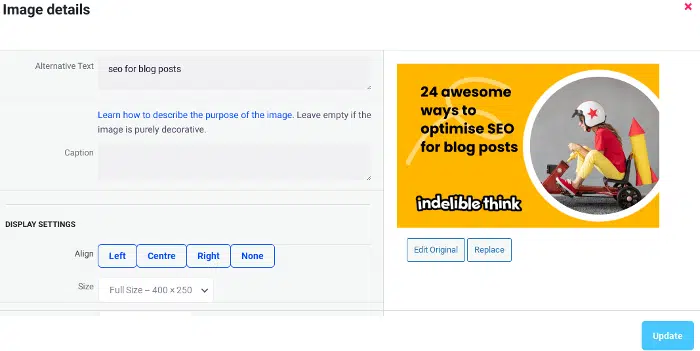
Using my keyphrase ‘SEO for blog posts‘ here helps it to rank in Google Image search results.
Ten. Include external links
Search engines love social proof, so if you mention research done by somebody else, link to their website. Don’t pass off that 10-year study as your own.
Eleven. Include internal links
Don’t just link out, link internally too.
Google loves it when you link to relevant posts on your website.
Not sure which posts might be relevant?
Here’s a quick tip:
- Head to Google
- Type site: [your domain name] “the keyword or keyphrase you’re using in your article.”
- Hit search
You’ll find a list of every page and post on your website that includes that search term will show up, giving you loads of ideas on which pages to link to.
When search engines see you linking to internal pages, it helps them work out the structure of your website faster, establishes a hierarchy and gives more visibility to your most valuable pages.
Twelve. Create blog post clusters
It’s also a good idea to create a blog post cluster, with one pillar post that’s dead in-depth and then posts that link to it that either separate each section of that larger post into its own, unique (and not just copied and pasted) article.
Or link to articles that are along the same theme.
I have a small blog post cluster, my main pillar post is:
I select this as my ‘Pillar’ post, and then within that post, link out to my other posts that are along the same links:
- 15 ways to write in a chatty tone of voice (with examples)
- Why your brand tone of voice is important
And keep creating posts that tie in with your main pillar posts, it’ll do your SEO wonders!
Thirteen. Add jump links (if needed)
A jump link directs the reader to a specific point further down the page, which is great if you know some people will want to skip a section and get to a juicy part.
You can add jump links by adding a ‘Table of Contents’ to your article (like I have at the top). Not many people realise it, but adding one really boosts SEO for blog posts.
Fourteen. Include a Call to Action
Include a call to action, whether you want the reader to work with you, download a free guide, buy a product, or subscribe to your newsletter.
This allows your audience to take action. The links will count towards your internal link count, and Google will be chuffed as nuts that readers have an action to complete at the end.
Fifteen. Use your keyphrase in the ‘Tag’ section
When you write a blog post, you can add a ‘tag’ to the post.
Yep, you guessed it, make it a tag too:
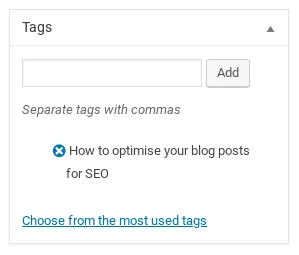
If you’re not using WordPress, this option might look slightly different, but it should be there.
Sixteen. Don’t forget your metadata
The bit you read on Google that explains what’s on your page?
That’s your metadata, here’s mine for this post:
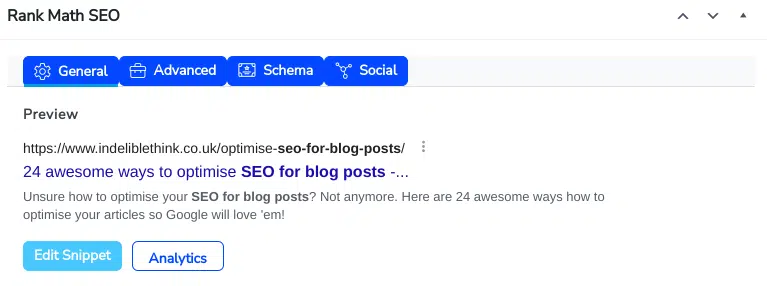
Plonk your word or phrase in there, and you’re done!
Seventeen. Include a breadcrumb trail
Breadcrumbs remind the reader where they are on your website. Let’s say you’re on a clothing website they look something like this:
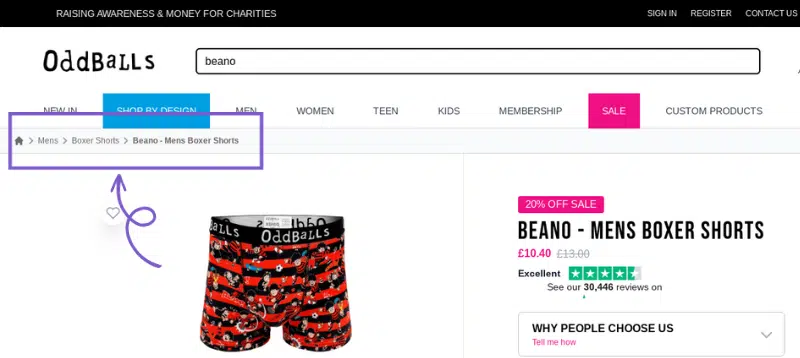
They are great for eCommerce sites, but they’re fine for normal websites, too.
That way, readers and Google can see a clear path to your page.
Eighteen. Install a blog optimisation tool
Install Yoast or better still, the free version of RankMath, as it’ll solve all your deadline and 404-page error problems instantly.
They’ll also tell you if you’ve underused your keyword (which will depend on the length of your article) and any other improvements you can make, like:
- Shortening the length of your Meta title (if it’s too long)
- Using more ‘transition’ words
- Duplicate sentence beginnings
- Keyword density
And a load of other useful stuff.
Don’t forget to do this, knowing the strength of your articles is vital in creating SEO friendly blog posts.
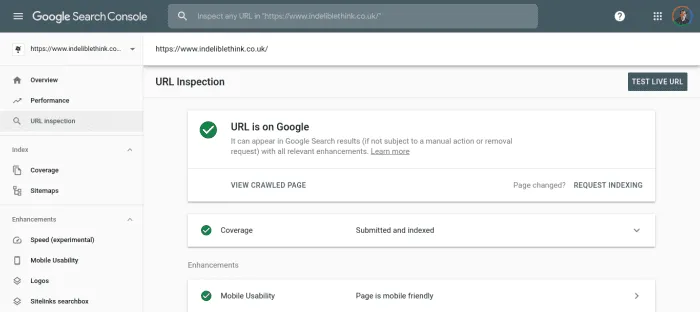
Nineteen. Set up a Google Search Console account
Help search engines find you faster by setting up a Google Search Console account.
When you want Google to crawl and index your page:
- Select ‘URL Inspection’
- Fill in the link to your page in the search bar at the top, and
- Hit ‘Request Indexing’
But don’t stop there because Google loves popular content, so make sure you share it on:
- Twitter/X
Create an image announcing your new post on Instagram and push users to click the link in your bio.
If it’s quality stuff, your readers will like and share it everywhere, so make sure everything you post serves a purpose and solves the problems of your target audience.
Twenty. Add a date to your posts
On your blog page, make sure it includes the date you posted it. And if you make amendments, change the publishing date before updating.
Why?
Cos it’ll bump your post up from page eight to page one.
I originally wrote this article in 2019 with just nine tips, when I relaunched my site in October 2023, I added fifteen more.

By updating the post date, readers know my site is active, and by asking Google to recrawl the page in Google Search Console (see 17), it knows I’m improving older content, which it loves too.
Twenty-one. Include an author bio
Don’t just sign your article off with your name, create an author bio. this tells your reader and search engines:
- Who you are
- What you do
- That you’re an authority in your industry
You’ll see at the end of this article, but here’s mine:
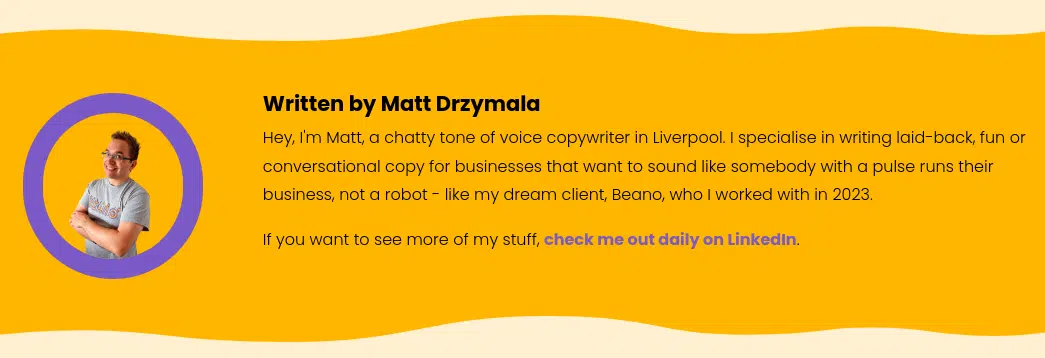
For extra authority, link it to a social media profile to give Google a nudge that you’re telling the truth and have the social media presence to prove it!
Twenty-two. Link to related articles
You don’t just have to link to related posts in the body of the article, you can add a section of related posts at the bottom of the post or in the sidebar (depending on your site layout).
It once again drives it home to search engines that you’re writing related stuff that’s worth checking out.
Twenty-three. Add social sharing buttons
People don’t bother to copy and paste your link to show someone.
Expect them to do that and they won’t.
So, make life dead simple, add social sharing buttons and let your fans do the promoting for you.
Twenty-four. Try and get high-authority backlinks
Getting a link from any website back to your post or site is great, but if you can get them from big names, Google will see you as a voice people need to listen to.
You’ll fly up the search engine rankings and get more eyes on what you’re saying.
Good luck, though, getting backlinks is flippin’ hard!
Quality content wins you customers
And there you have it, a fully optimised article.
However, having great SEO is only the start. If your content is a load of self-indulgent cobblers, it won’t matter how good your SEO is, people won’t care.
Ensure every piece of content you post is quality – and post regularly.
Quality content:
- Builds trust
- Establishes you as a voice of authority, and
- It makes your target audience look to you when they need their problems solving
So, before you hit the ‘Publish‘ button, shout:
“What’s the point?”
And if the answer includes:
- It solves my customers’ problems
Then, you’re on the right track.
Ready to optimise SEO for your blog posts?
Great!
Starting a fresh article is always exciting, but working out how to optimise your blog posts for SEO can be a real headache – but not anymore.
Follow my tips, and you’ll be an SEO wizard.
However, if writing blog posts and optimising them isn’t your thing, or you don’t have time to fit them into your busy schedule, why not outsource them to a copywriter?
Or hire an SEO copywriter with bucket loads of experience, like me.
Get in touch, and let’s chat about how I can do it for you – and even if you’d prefer a retainer model.
Until next time,
Matt
PS. To ensure people read your posts, check out my article How to make your blog more engaging and 5 reasons why blogging is important.
PS. And for more help, check out, How to create a homepage that’ll improve your website traffic.
PPS. Or if you’re struggling to get your website ranking, check out Why is my website not showing on Google? (& 12 great fixes!).